Network üzerinden adli analiz gerçekleştirilmesi gereken durumlarda analiz edilebilecek en değerli sayısal delil ağ üzerinden yakalanan tam paket verisidir ve bu veriler genellikle biz adli bilişim uzmanlarına PCAP formatında sunulur. Bu ağ paketleri tam paket bilgisi içerecek şekilde kaydedilmişse çok daha kıymetlidir ve gerçekleştirilecek adli analizin sonucunda elde edebileceğimiz sonuçları oldukça önemli ölçüde pozitif şekilde etkiler.
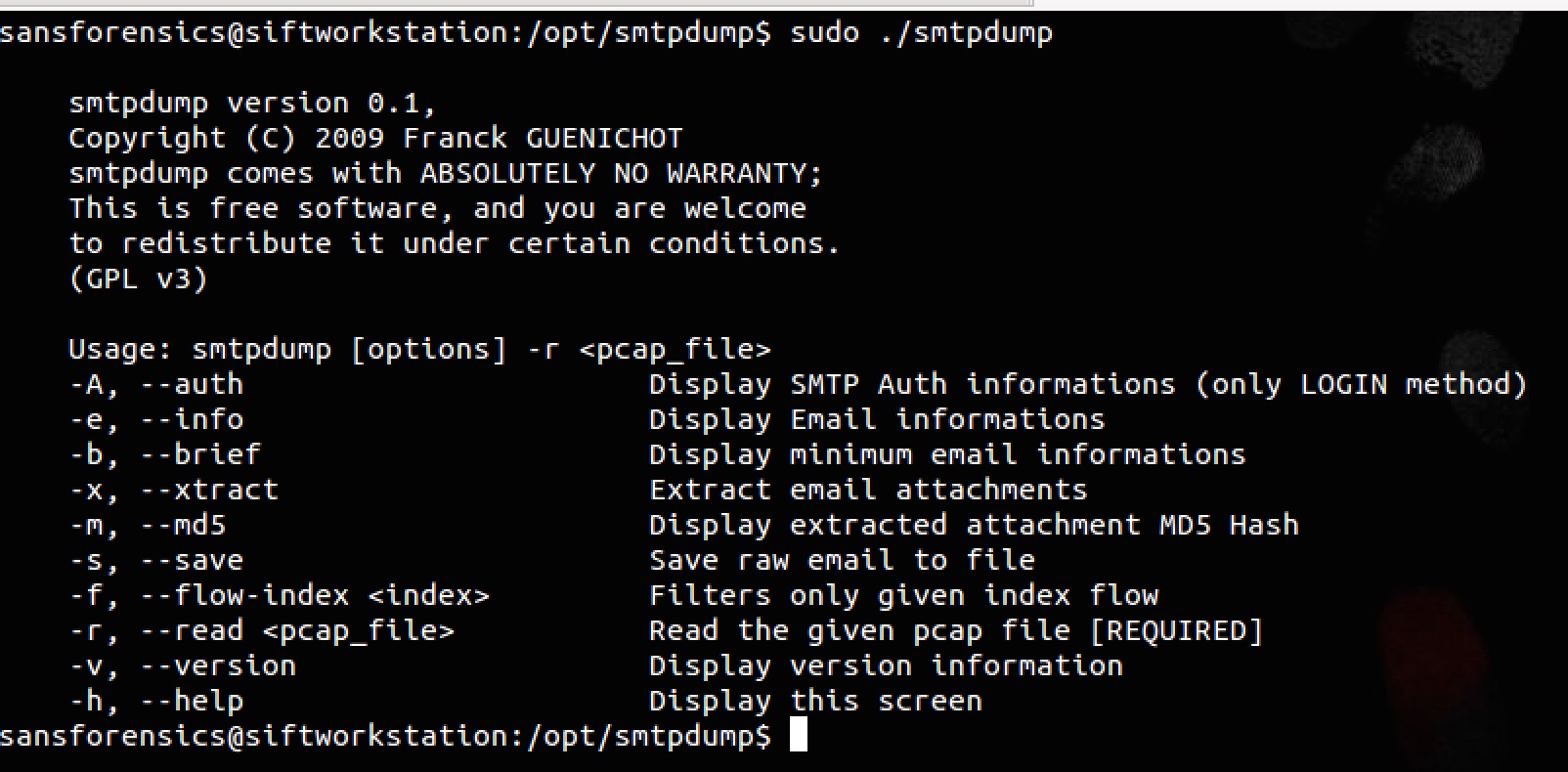
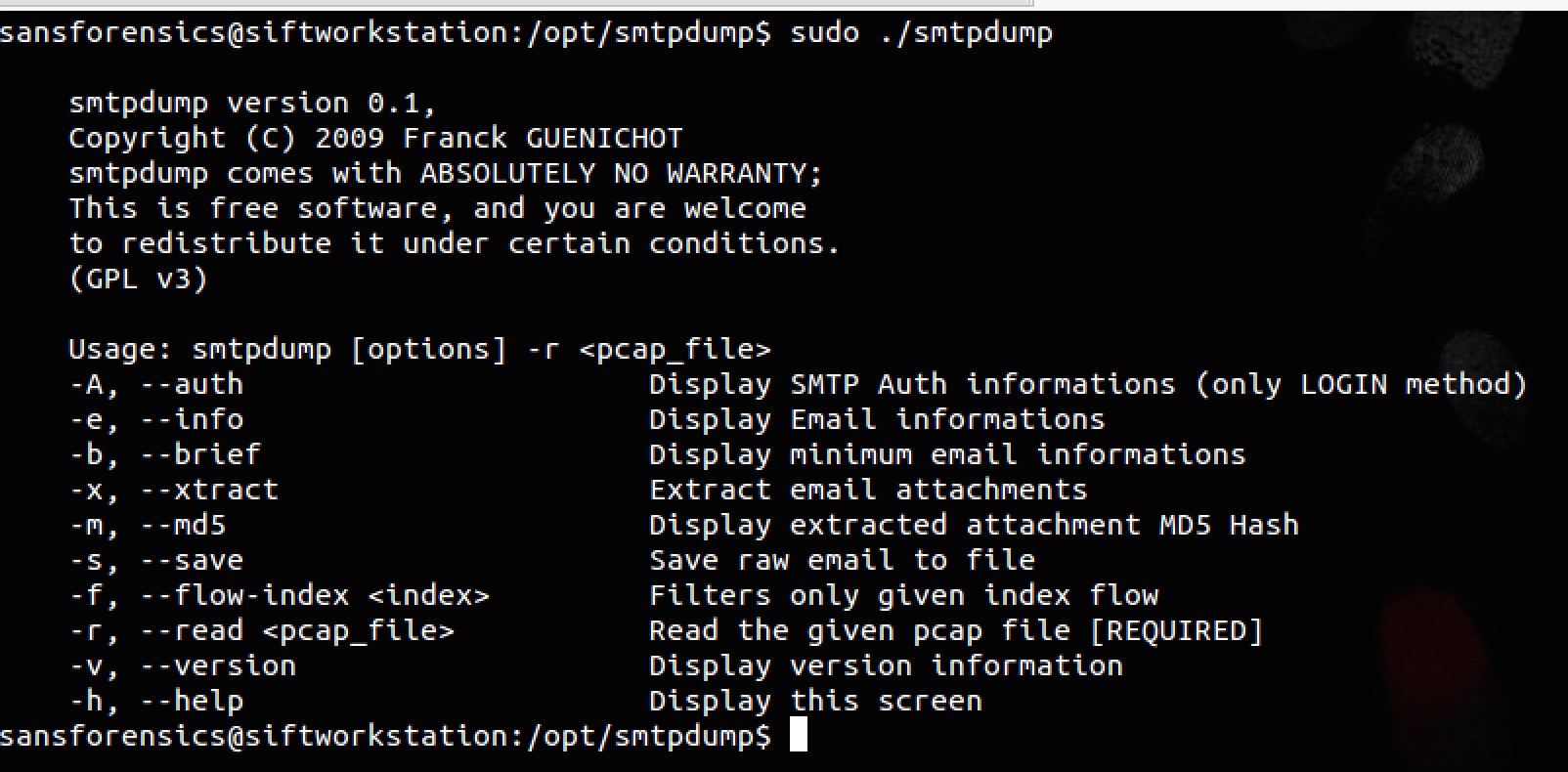
Bu makalede bir PCAP dosyası içinde yer alan STMP trafiğini analiz edebileceğimiz bir kaç araçtan bahsedeceğim. Bu araçlardan ilki smtpdump ve http://www.aldeid.com/wiki/Smtpdump adresinden indirebilirsiniz. Kurulumla ilgili bilgiler de ilgili sayfada yer alıyor. Kurulumu gerçekleştirdikten sonra herhangi bir parametre kullanmadan çalıştırdığınızda karşınıza aşağıdaki gibi bir yardım menüsü çıkacaktır.
(Örnek olarak kullanılan pcap dosyasını http://forensicscontest.com/contest02/evidence02.pcap adresinden indirebilirsiniz.)

Bu aracın bize sunmuş olduğu özelliklerin başında PCAP içinde yer alan SMTP trafiğindeki kimlik doğrulama bilgilerini kolay bir şekilde bize sunması. Bunun için -A parametresi ile uygulamayı çalıştırmamız yeterli olacaktır. Bu parametresini örnek kullanımı ve örnek çıktı aşağıdaki ekran çıktısında yer almaktadır.

Yukarıdaki örnek çıktıdan da görülebileceği üzere 192.168.1.159 IP adresinden 64.12.102.142 adresinde koşan SMTP sunucusuna iki kez bağlantı gerçekleştirmiş ve bu bağlantı sırasında kullanılan kullanıcı adı ve şifre bilgisi de ekran çıktısında yer almaktadır. Smtpdump’ın bir diğer özelliği ise ilgili PCAP dosyasında yer alan SMTP trafiği içindeki mail eklentilerini çıkartıp diske kaydedebilmesi. Bu özelliğe ilişkin örnek kullanıma ait ekran görüntüsü de aşağıda yer almaktadır.

SMTP trafiğini PCAP dosyaları üzerinden analiz etmek için kullanabileceğimiz bir diğer yazılım ise findsmtpinfo.py. Bu uygulamayı https://bitbucket.org/jrossi/forensicscontest/src/d447c0539d03/contest-2/findsmtpinfo.py adresinden indirebilirsiniz. Herhangi bir parametre girmeden uygulamayı çalıştırdığınızda sizden girdi olarak bir pcap dosyası belirtmenizi isteyen bir mesaj çıkar karşınıza. Yukarıdaki örnekte kullandığımız pcap dosyasını bu uygulamaya da girdi olarak verdiğimizde aşağıda yer alan çıktı ile karşılaşırız.
1sansforensics@siftworkstation:/opt/smtpdump$ sudo ./findsmtpinfo.py -p evidence02.pcap—————————————-Report: 192.168.001.159.01036-064.012.102.142.005872—————————————-3Found SMTP Session data4SMTP AUTH Login: [email protected]5SMTP AUTH Password: 558r00lz6SMTP MAIL FROM: 7SMTP RCPT TO: 8Found email Messages9– Writing to file: ./report/messages/1/192.168.001.159.01036-064.012.102.142.00587.msg10– MD5 of msg: e295a3990b3987a8864383832fea6df911– Found Attachment12– Writing to filename: ./report/messages/1/part-001.ksh13– Type of Attachement: text/plain14– MDS of Attachement: 541812ed71a51b9c1ae07741ed5ae63c15– Found Attachment16– Writing to filename: ./report/messages/1/part-001.html17– Type of Attachement: text/html18– MDS of Attachement: 18d3f88dbc6b152aba923e8c083033f919—————————————-20Report: 064.012.102.142.00587-192.168.001.159.0103821—————————————-22Found SMTP Session data23—————————————-24Report: 064.012.102.142.00587-192.168.001.159.0103625—————————————-26Found SMTP Session data27—————————————-28Report: 192.168.001.159.01038-064.012.102.142.0058729—————————————-30Found SMTP Session data31SMTP AUTH Login: [email protected]32SMTP AUTH Password: 558r00lz33SMTP MAIL FROM: 34SMTP RCPT TO: 35Found email Messages36– Writing to file: ./report/messages/2/192.168.001.159.01038-064.012.102.142.00587.msg37– MD5 of msg: 844661d8332eb00e537a8b15deedf26938– Found Attachment39– Writing to filename: ./report/messages/2/part-001.ksh40– Type of Attachement: text/plain41– MDS of Attachement: ba2c98f65f3f678b6a71570adcf362f442– Found Attachment43– Writing to filename: ./report/messages/2/part-001.html44– Type of Attachement: text/html45– MDS of Attachement: d07c3b721fed36a725c01e4827c1a56346– Found Attachment47– Writing to filename: ./report/messages/2/secretrendezvous.docx48– Type of Attachement: application/octet-stream49– MDS of Attachement: 9e423e11db88f01bbff81172839e192350– ZIP Archive attachment extracting51– Found file52– Writing to filename: ./report/messages/2/secretrendezvous.docx.unzipped/[Content_Types].xml53– Type of file: application/xml54– MDS of File: f7a7f13f9d124fcc3527e57f342a097955– Found file56– Writing to filename: ./report/messages/2/secretrendezvous.docx.unzipped/_rels/.rels57– Type of file: None58– MDS of File: 77bf61733a633ea617a4db76ef769a4d59– Found file60– Writing to filename: ./report/messages/2/secretrendezvous.docx.unzipped/word/_rels/document.xml.rels61– Type of file: None62– MDS of File: c9c49c2d0f5b9a5ce63d1e0d86bb5e2563– Found file64– Writing to filename: ./report/messages/2/secretrendezvous.docx.unzipped/word/document.xml65– Type of file: application/xml66– MDS of File: 5b1a947f30db83f4170b009dedd38fab67– Found file68– Writing to filename: ./report/messages/2/secretrendezvous.docx.unzipped/word/media/image1.png69– Type of file: image/png70– MDS of File: aadeace50997b1ba24b09ac2ef1940b771– Found file72– Writing to filename: ./report/messages/2/secretrendezvous.docx.unzipped/word/theme/theme1.xml73– Type of file: application/xml74– MDS of File: 9d84374caf9c73ec77677afd23cb7b2275– Found file76– Writing to filename: ./report/messages/2/secretrendezvous.docx.unzipped/word/settings.xml77– Type of file: application/xml78– MDS of File: 4788c0aa840fb18d7e5bd74936317dcc79– Found file80– Writing to filename: ./report/messages/2/secretrendezvous.docx.unzipped/word/webSettings.xml81– Type of file: application/xml82– MDS of File: 15065d2de3eddbb09d84337a09fd798583– Found file84– Writing to filename: ./report/messages/2/secretrendezvous.docx.unzipped/word/styles.xml85– Type of file: application/xml86– MDS of File: d0c2c9bec6e9c2597b174ababf1b219187– Found file88– Writing to filename: ./report/messages/2/secretrendezvous.docx.unzipped/docProps/core.xml89– Type of file: application/xml90– MDS of File: 32ecd3799f69751a53ce10825372fd3691– Found file92– Writing to filename: ./report/messages/2/secretrendezvous.docx.unzipped/word/numbering.xml93– Type of file: application/xml94– MDS of File: 5583fc19ed6bdf4ee5402f32ef42c49295– Found file96– Writing to filename: ./report/messages/2/secretrendezvous.docx.unzipped/word/fontTable.xml97– Type of file: application/xml98– MDS of File: de2ae9c06e07370391b996f069f1dfba99– Found file100– Writing to filename: ./report/messages/2/secretrendezvous.docx.unzipped/docProps/app.xml101– Type of file: application/xml102– MDS of File: b3923a08674ac7c56babca89c3409107103—————————————-104Writing complete report to: ./report/output-report.txt105MD5 Hash of report: c438ddd8d1e70f0c46a76ea2001273d9106Finished107sansforensics@siftworkstation:/opt/smtpdump$Uygulama çalıştırıldığında ./report dizini altına da bulguların yer aldığı txt formatında bir dosya oluşturur ve bu raporda yer alan bilgiler uygulamanın ekrana bastığı çıktıların aynısıdır. Örnek bir rapor çıktısı aşağıdaki ekran görüntüsünde yer almaktadır.